
Blocky Platform Run
Opens in a play window — no download required.
Reviews
Blocky Platform Run succeeds by keeping its design simple and focused. The stages are well-paced, gradually introducing new challenges without overwhelming the player. The online races provide a friendly competitive edge that motivates repeated attempts. Controls are responsive, and the visual clarity helps players plan their jumps. While it lacks deep customization or story, the game delivers exactly what it promises: a fun, skill-based platforming experience suitable for all ages. It is an excellent choice for quick sessions or longer practice runs.
Description
Core Gameplay Loop
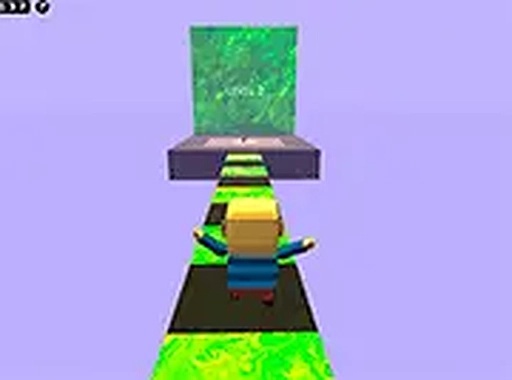
Blocky Platform Run presents a straightforward objective: guide your character from the start of each course to the finish line. The path is filled with platforms of varying sizes, gaps that require precise leaps, and barriers that test your timing. Success depends on reading the layout ahead and executing controlled movements. The game rewards patience and observation over speed, especially in later stages where the margin for error shrinks.
Stage Design Philosophy
Each course introduces a new arrangement of obstacles, encouraging players to adapt their approach. Early stages focus on basic jumping and landing, while later ones incorporate moving platforms and tighter spacing. The blocky visual style makes distances and heights easy to judge, which helps players plan their route. The progression feels natural, gradually building confidence and skill without overwhelming newcomers.
Competitive Racing Element
An online multiplayer component allows participants to race through courses simultaneously. This adds a layer of excitement as you can see opponents progress in real time. Finishing first requires not only completing the course but doing so efficiently. Watching others navigate tricky sections can reveal alternative paths or techniques. The competitive aspect encourages repeated play and mastery of each stage.
Controls and Accessibility
Movement is handled with standard keyboard keys, typically the arrow keys or WASD for direction and the spacebar for jumping. The control scheme is intuitive, allowing players of any age to start immediately. The game runs entirely in a desktop browser with no installation required. A full screen option provides a clearer view of the course layout, which is helpful for precision jumps.
Visual and Audio Atmosphere
The blocky, colorful graphics create a cheerful and inviting environment. Characters and environments are rendered in a simple, clean style that avoids visual clutter. This design choice makes obstacles and platforms stand out clearly, aiding navigation. The audio is minimal but functional, with sound effects for jumps and landings that provide feedback without being distracting.
Skill Development and Mastery
As players repeat stages, they develop muscle memory for jump distances and timing. The game does not punish failure harshly; each attempt restarts the course quickly, encouraging experimentation. Over time, players learn the most efficient routes and can complete stages with greater speed. This gradual improvement is satisfying and keeps the experience engaging for repeated sessions.



Comments
Sign in to leave a note
You must be logged in before posting a review or rating.
No account? Create one
No comments yet. Be the first to comment!